
Most WordPress blogs rank poorly because their owners skip the fundamentals. We at Emplibot have seen this pattern repeatedly-sites with solid content still fail to rank because they ignore basic WordPress blog SEO tips.
The good news? You don’t need months of work to see results. This post covers actionable changes you can implement today that will move your rankings forward.
On-Page SEO That Actually Moves Rankings
Title tags and meta descriptions Drive Click-Through Rates
Your title tag and meta description form the first impression Google shows potential visitors. Most WordPress blogs waste this real estate with vague, keyword-stuffed phrases that fail to convert clicks. A strong title tag places your primary keyword within the first 60 characters, keeps the total length around 70 characters, and clearly states what the reader gets. Meta descriptions should expand on the title by explaining the angle or benefit, not just repeating keywords.
Google Search Console reveals exactly which pages have high impressions but low click-through rates. If a page receives 200 impressions but only 5 clicks, your title and meta description are the problem. Rewrite them to highlight a concrete outcome. Instead of “WordPress Blog SEO Tips,” try “WordPress SEO: 5 Quick Wins to Rank This Month.”
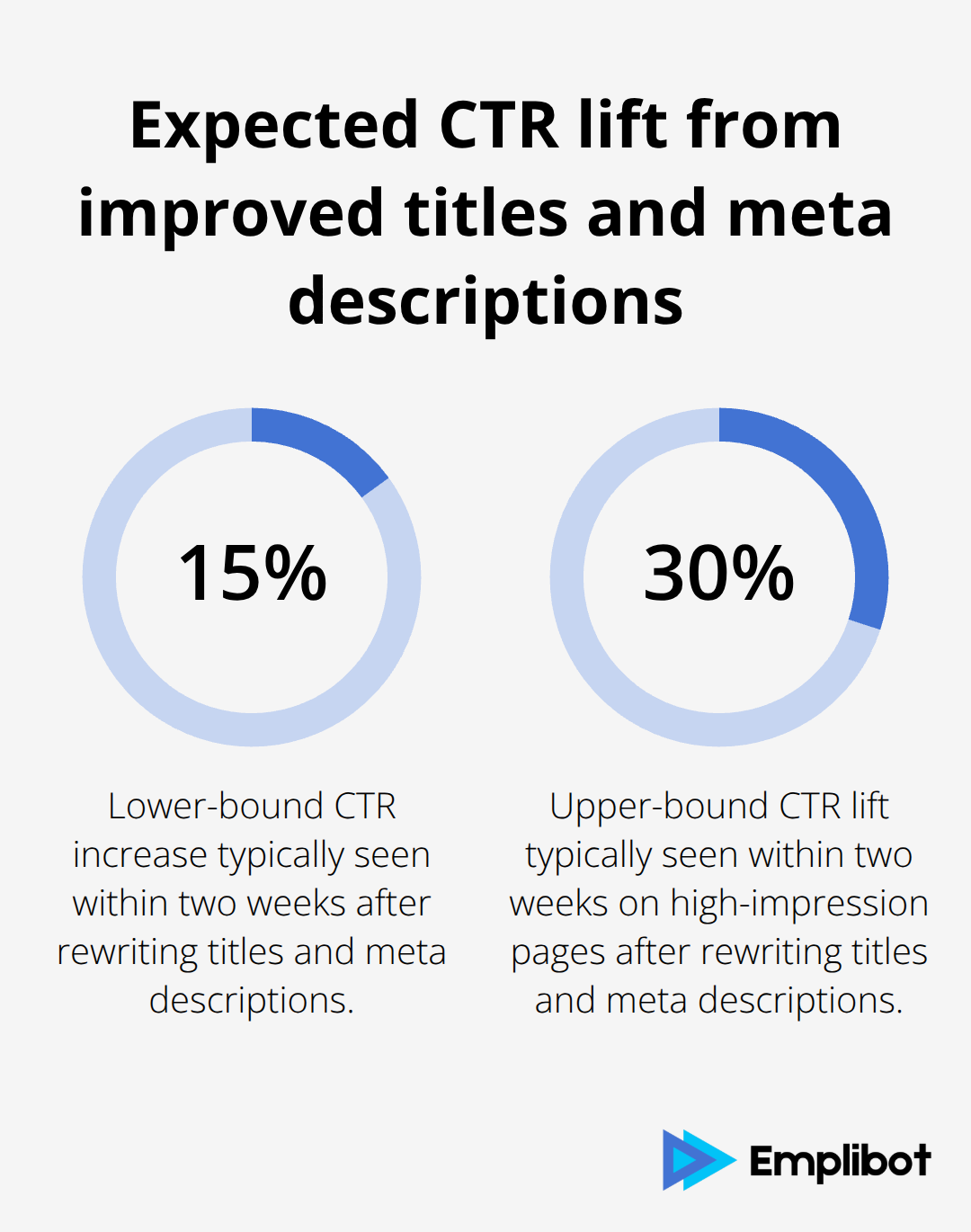
The second version answers the when question and sets expectations. Test this approach on your three highest-impression pages first. You’ll typically see a 15–30% CTR lift within two weeks.
Heading structure for SEO Guides Both Readers and Search Engines
Heading tags tell both Google and readers what your content covers. One H1 per page is non-negotiable, and it should match your primary keyword or closely mirror it. WordPress themes typically auto-generate H1 from your post title, which is correct. Your H2s should be descriptive subheadings that reflect the main sections of your post, and each H2 should have 2–3 H3s beneath it for deeper points.
Avoid generic headings like Introduction or Conclusion. Instead, write headings that answer specific questions your reader typed into Google. If you’re targeting “how to optimize WordPress for SEO,” your H2s might be “Set Up Clean Permalinks First,” “Configure Your XML Sitemap,” and “Fix Crawl Errors in Search Console.” This structure improves scannability, helps search engines extract meaning, and increases your chances of appearing in featured snippets.
Tools like Yoast or Rank Math show you readability scores in the WordPress editor, so apply their feedback to break up dense paragraphs and ensure every section has a clear heading. Long-tail keywords belong in your H2s and H3s, not forced into the body. A long-tail keyword like “WordPress SEO plugin for small blogs” naturally fits as an H3 if you’re discussing plugin selection. This approach sets you up perfectly for the technical foundations that follow.
Technical SEO Foundations for WordPress Sites
Site speed directly impacts your ability to rank. Google’s Core Web Vitals ranking signals-Largest Contentful Paint (LCP), Cumulative Layout Shift (CLS), and Interaction to Next Paint (INP)-measure real-world user experience for loading performance, interactivity, and visual stability of the page. Target LCP under 2.5 seconds, CLS under 0.1, and INP under 200 milliseconds. Most WordPress blogs fail these thresholds because they load too many plugins, use unoptimized images, and skip caching entirely.
Test Your Speed and Fix the Biggest Bottlenecks
Test your site right now using Google PageSpeed Insights. If your mobile LCP exceeds 3 seconds, your speed is costing you rankings. Start by disabling plugins you installed but never use-a typical WordPress site runs 20+ plugins, yet half provide no measurable value. Each plugin adds overhead.
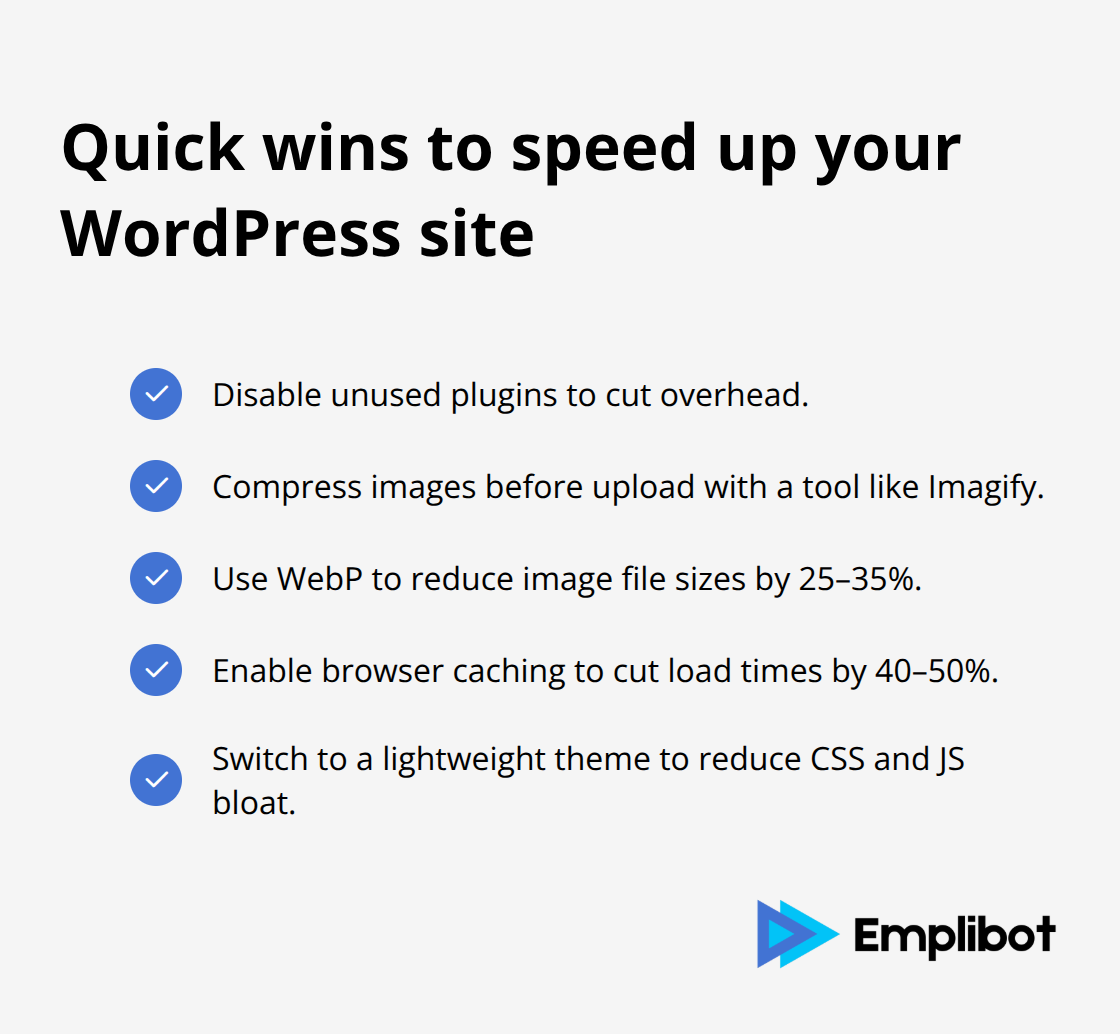
Next, compress images aggressively using a tool like Imagify before uploading. Modern formats like WebP cut file sizes by 25–35% compared to JPEG. Enable browser caching through your hosting provider or a caching plugin; this alone typically cuts load times by 40–50%. If your theme loads excessive CSS and JavaScript, switch to a lightweight option like Astra, Neve, or Blocksy. Heavy themes bloat pages with features you never use.
Clean URLs Guide Google Through Your Content Structure
Clean, descriptive URLs matter more than most WordPress owners realize. Set your WordPress permalink structure to Post Name so URLs read like /wordpress-seo-tips/ instead of /?p=123. A descriptive URL structure should include the target keyword and be descriptive of the content. If you’ve already published with numeric URLs, implement 301 redirects to move to descriptive slugs; a plugin like Redirection handles this without manual work.
Internal linking distributes authority and guides both users and crawlers through your site. Link from high-traffic posts to related content using contextual anchor text that describes the destination. If your post on WordPress plugins mentions XML sitemaps, link to your dedicated sitemaps post with the anchor text set to that topic, not generic phrases like click here. Most WordPress sites create internal links haphazardly or not at all. A practical approach: identify your five highest-traffic posts and add 2–3 internal links from each to related content. This boosts pageviews and helps lower-authority posts gain visibility through link equity.
Sitemaps and Crawl Configuration Remove Friction for Search Engines
XML sitemaps tell Google exactly which pages exist on your site and how often they change. Generate your sitemap using Yoast or Rank Math-both plugins create sitemaps automatically-then submit it to Google Search Console. This step takes 10 minutes and eliminates months of potential crawl delays. Robots.txt files control which parts of your site crawlers can access. Most WordPress installations have a default robots.txt that works fine. Check yours by visiting yoursite.com/robots.txt. If it’s missing or malformed, add one through your WordPress settings or hosting control panel. The file should allow crawlers to access your posts and pages while blocking admin areas and duplicate content.
Crawl errors in Google Search Console indicate pages Google cannot reach or understand. Check Search Console monthly for 404 errors, server errors, or redirect chains. A single redirect chain (page A redirects to B, which redirects to C) slows crawl efficiency. Fix these immediately by pointing page A directly to page C. These technical foundations work together: fast sites with clean URLs and proper sitemaps rank higher because Google crawls them efficiently and users stay longer. With your site’s technical foundation solid, your content strategy determines whether those crawls actually result in rankings.
Content Strategy That Drives Rankings
Topical Clusters Establish Authority Faster Than Random Posts
Content clusters matter far more than publishing randomly. Most WordPress blogs publish one post on WordPress SEO, another on keyword research, a third on backlinks-with no connection between them. Google rewards sites that establish topical authority by grouping related posts around a central theme. Start with one pillar topic like WordPress SEO fundamentals, then create 5–7 supporting posts that link back to that pillar.
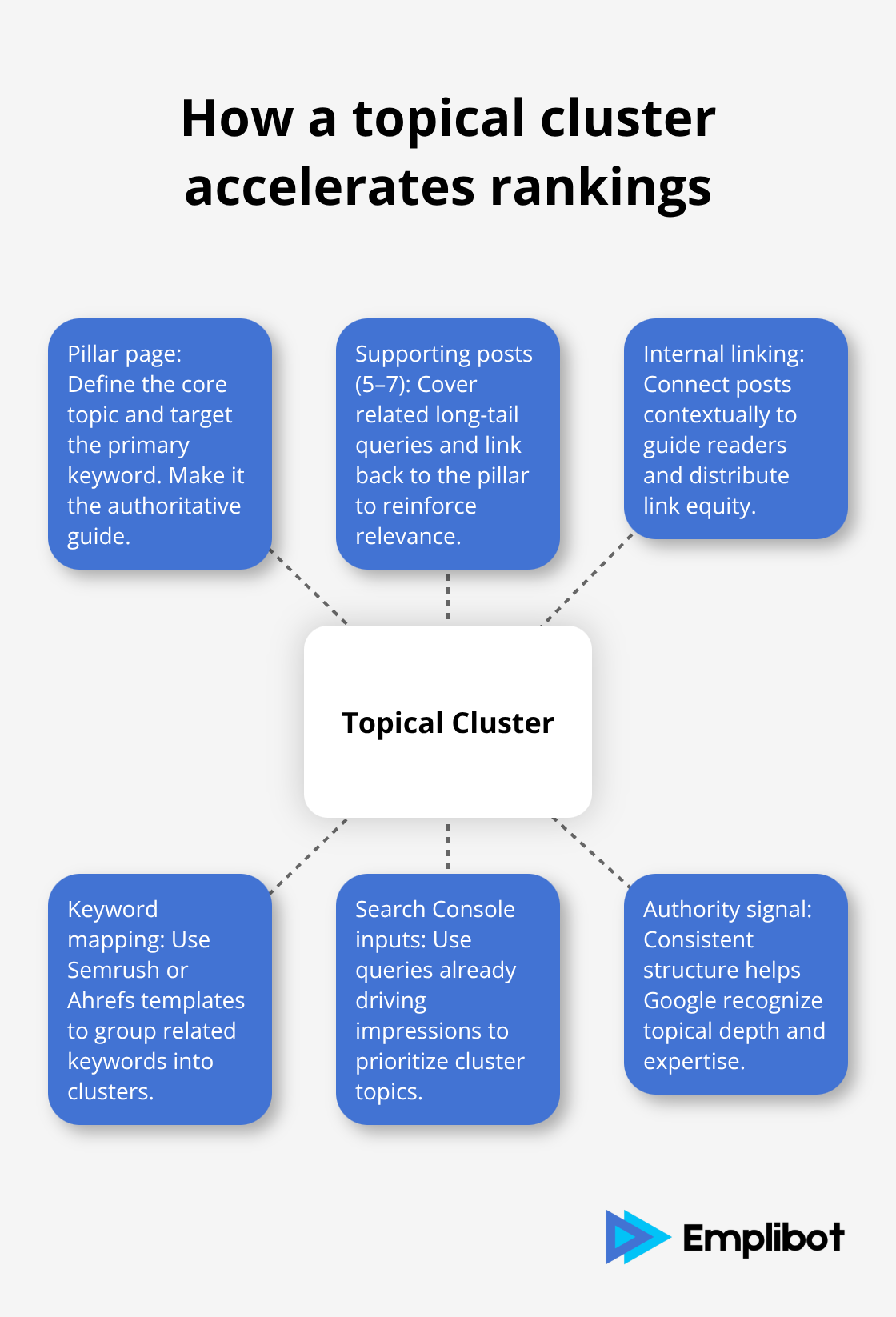
Each supporting post targets a related long-tail keyword: WordPress SEO for small blogs, WordPress SEO plugins, WordPress SEO checklist. Semrush and Ahrefs both offer cluster templates that show you which keywords belong together. This structure signals to Google that you own the topic, not just one article.
Sites using topical clusters establish topical authority by organizing content around central themes. The practical step: audit your existing posts and identify your strongest article on a broad topic, then write 3–4 new posts targeting related keywords that link back to that pillar. Your Google Search Console already shows you which keywords drive traffic; use those as your content strategy foundation.
Refresh Weak Posts Before You Write New Ones
Refreshing old content outperforms publishing new posts in most cases. A post ranking on page two with 150 monthly impressions but zero clicks needs a rewrite, not a new article. Open Google Search Console, filter for pages ranking positions 11–30, and identify posts with strong impressions but weak click-through rates. Rewrite the title and meta description first-this alone typically lifts CTR by 20–25% within two weeks.
Then strengthen the opening paragraph by stating why the topic matters and what readers will learn. Add 2–3 internal links from your highest-traffic posts to this refreshed article, which accelerates its climb to page one. This approach costs far less than creating entirely new content while delivering faster results.
Guest Posts Generate Authority When You Target the Right Sites
Backlinks remain essential, but most WordPress owners approach link building wrong. Guest posting on relevant blogs generates both referral traffic and authority signals, but only if the host site has real traffic and relevance to your niche. Research blogs in your industry using Ahrefs, check their Domain Rating, and verify they receive actual visitors through Similarweb. A post on a site with 500 monthly visits and high relevance beats ten posts on random sites with 10,000 visits.
Pitch topics that solve real problems for their audience, not generic content. If you run a WordPress blog, pitch WordPress-specific topics to WordPress blogs, not SEO blogs. This precision approach converts guest posts into actual rankings and traffic rather than vanity metrics.
Final Thoughts
You can implement these WordPress blog SEO tips this week and see measurable results within two weeks. Start by rewriting title tags and meta descriptions for your three highest-impression pages using Google Search Console data, then disable unused plugins and compress images to improve Core Web Vitals. These changes take a few hours but typically deliver ranking improvements that compound over time.
Track your progress monthly using Google Search Console to monitor which pages gain impressions and which ones climb from page two to page one. A 20% CTR improvement on a page with 500 monthly impressions means 100 additional clicks per month, and that momentum accelerates as more pages rank higher. After implementing these quick wins, move to longer-term work: build topical clusters around your strongest posts, refresh underperforming content before writing new articles, and pursue guest posts on relevant sites with real traffic.
Sites that master on-page optimization, fix technical foundations, and execute a deliberate content strategy rank higher than competitors who publish randomly. Emplibot automates your WordPress blog by handling keyword research, content creation, and SEO optimization end-to-end, so you focus on strategy while the system handles execution. Whether you implement these tips manually or use automation, the fundamentals remain the same: optimize what ranks, fix what’s broken, and build authority through topical depth.